良く使うガイドとリンク
その他のガイドはサービスメニューにあります。
WiFiの推奨設定はこちら
| SRAS | AMI | ScombZ(障害情報/お知らせ) | オンライン授業 |
 はじめて はじめて |
 学生用 学生用 |
|
|
|




日時
2026年4月28日(火)~5月7日(木)
詳細
以下の期間では、開室時間が通常と異なります。
期間:4/28~5/7
| 日付 | 授業 | 窓口 |
| 4月28日(火) | 通常授業 | 〇 |
| 4月29日(水) | 通常授業 | ◯ |
| 4月30日(木) | 通常授業 | ◯ |
| 5月1日(金) | 通常授業 | ◯ |
| 5月2日(土) | 通常授業 | ◯ |
| 5月3日(日) | 休 | × |
| 5月4日(月) | オンデマンド授業日 | × |
| 5月5日(火) | 休講 | × |
| 5月6日(水) | 休講 | × |
| 5月7日(木) | 休講 | × |
| 5月8日(金) | 通常授業 | ◯ |
上記のとおり、ゴールデンウィーク期間中は、一部日程で閉室となっております。
ご不便をおかけいたしますが、あらかじめご確認のうえ、ご利用くださいますようお願いいたします。
現在、2026年度に2年生になる大学院生の皆様が、
M365のサービス(TeamsやOneDrive等)が利用できない障害が発生しております。
ご迷惑をおかけして申し訳ございませんが、復旧までもう少々お待ちください。
復旧いたしました。
年次更新により、新M2の皆さんのライセンス付与対象のグループから外れたことが原因でした。
状況は以下の通りです。
3月18日
6時頃 日次バッチによりライセンス付与対象グループから、新M2メンバーが外れる
同時にM365のライセンスが、新M2の皆さんから外れる
10時17分 ユーザからの問い合わせにより事象の発覚 調査と対策を開始する
13時18分 復旧
2026年1月、Google Workspace における Microsoft Office の相互運用性が改善され、ドキュメント、スプレッドシート、スライド内で直接、パスワードで保護された Microsoft Office ファイルを編集できるようになりました。
一方で、ファイルの開き方によっては設定されたパスワードが削除される場合があります。
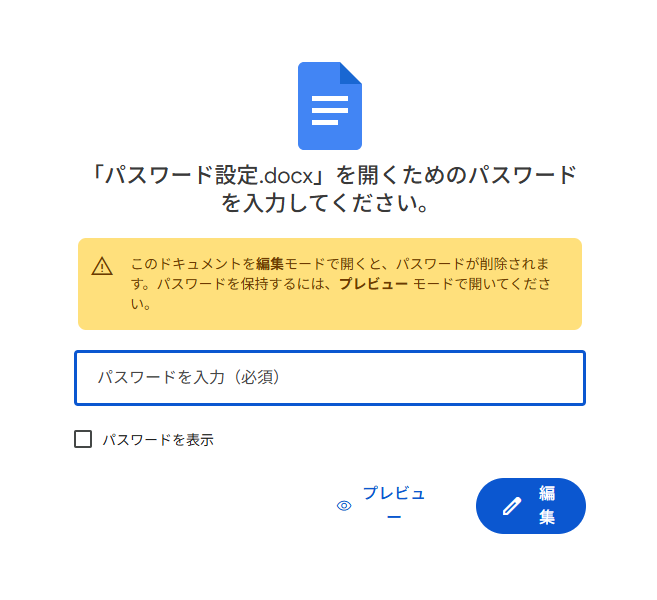
パスワードが一度削除されると、その後のアクセスはパスワードなしで可能となります。
パスワード付きの MS Office 形式のファイルを、ブラウザ上のGoogle Drive で開く際は、目的に応じて以下の操作を選択してください。
・内容を確認する 「プレビュー」で開く
・パスワードを維持して編集する 「PC版ドライブ」で開く
なお、PDF形式では、パスワード削除は発生しないようです。
パスワードが削除されてしまった場合は、PC版ドライブ上でファイルを開いて再設定、あるいは、パスワード設定済ファイルの再アップロードが必要となります。
皆さまのご理解とご協力をお願い申し上げます。
参考情報
https://workspaceupdates.googleblog.com/2026/01/edit-password-protected-office-files-google-drive.html?m=1
2026/02/16(月)に、SRAS無線LANで利用している認証サーバのサーバ証明書を更新いたします。
更新後、SRAS無線LANがつながならなくなることがあります。
その場合は、いったん設定を削除の上、再度設定を行ってください。
SRAS無線LANの設定方法に関しましては、こちらをご確認ください。
さくらタームのPC教室の閉室および窓口業務についてのお知らせです。
●対象期間
・2026/1/27(火) ~ 2026/4/13(月)
対象期間中の入構禁止期間(全日閉室)
2026/1/29(木)18:00 ~ 2026/2/5(月)12:00
2026/2/19(木)18:00 ~ 2026/2/22(日)12:00
●PC教室について
・開室日時
(豊洲) 月~金 9時 ~ 20時
(大宮) 月~金 9時 ~ 20時30分
※入構禁止期間は除く
・閉室日
土/日/入構禁止期間
※ 廊下等に設置された複合機やプロッタの利用は可能ですが、用紙補充やその他トラブル発生時のサポートは一切ありません
※ 閉室日に関しては、セルフ利用もできません
●利用可能教室
・豊洲:教室棟6F 実習室6
・大宮:5号館1F 情報処理教室
※教室利用予約がある日は別教室となる可能性があります
●窓口対応時間
・(豊洲) 9時 ~ 20時
・(大宮) 9時 ~ 17時 ※5号館窓口のみ
※PC教室開室日のみ対応します
何卒ご理解・ご協力のほどよろしくお願いいたします。
ScombZを介してExamena(外部サイト)が利用できるようになりました。
具体的な利用方法は、
以下にあります、「テストを作る」内にあります、Examenaのリンクをクリックください。
以下日時において、ScombZのメンテナンスを行います。
11月18日(月) 20時~21時 20:20 完了 (2024/11/18 20:20 更新)
メンテナンス中は接続不良が発生します。
ログインはお控えください。
ご不便をおかけして大変申し訳ございませんが、
ご協力の程何卒よろしくお願いいたします。
本日、以下の時間でメンテナンスを行うため、
ScombZをご利用いただけません。
11月6日(水) 10時~13時
ご迷惑をおかけしますが、ご協力のほど何卒よろしくお願いいたします。
以下日時において、ScombZのメンテナンスを行います。
2024年6月13日(木) 20時~21時
メンテナンス中は接続不良が発生します。
ログインはお控えください。
ご不便をおかけして大変申し訳ございませんが、
ご協力の程何卒よろしくお願いいたします。
2024年4月27日現在、
通知メールに記載してるScombZに遷移するURLにアクセスすると、
システムエラーになるという障害が発生しております。
本件に関しましては、即時の対応が難しく、修正が4月30日頃になる見込みです。
続報あれば、こちらに追記いたします。
Microsoft Authenticatorアプリにおいて、情報漏えいにつながる可能性のある脆弱性(CVE-2026-41615)が公表されています。
本学の各種サービスで多要素認証を利用している方は、以下の内容をご確認のうえ、
すみやかにMicrosoft Authenticatorアプリを最新版へ更新してください。
【対象アプリ】
Microsoft Authenticator
【対象端末】
Microsoft Authenticatorをインストールしているスマートフォン・タブレット等
【対応内容】
各アプリストアから、Microsoft Authenticatorを最新版へ更新してください。
・iPhone / iPadをご利用の方
App StoreからMicrosoft Authenticatorを更新してください。
・Android端末をご利用の方
Google PlayストアからMicrosoft Authenticatorを更新してください。
【確認をお願いしたいバージョン】
以下のバージョン未満をご利用の場合は、更新が必要です。
・iOS版:6.8.47未満
・Android版:6.2605.2973未満
【更新方法】
以下のMicrosoft公式ページを開き、ご利用の端末に応じてQRコードを読み取るか、App StoreまたはGoogle Playストアへのリンクを開いてください。
Microsoft Authenticator のダウンロード
https://support.microsoft.com/ja-jp/authenticator/download-microsoft-authenticator
アプリの自動更新を有効にしている場合でも、更新が完了していないことがあります。
お手数ですが、アプリストア上で最新版になっているかご確認ください。
なお、更新後もMicrosoft Authenticatorに登録済みのアカウント情報は通常そのまま利用できます。
【参考】
Microsoft公式サイト:
https://msrc.microsoft.com/update-guide/vulnerability/CVE-2026-41615
ご不明な点がある場合は、以下の連絡先までお問い合わせください。
学生:oshiete@sic.shibaura-it.ac.jp
教職員:goiken@sic.shibaura-it.ac.jp
--
A vulnerability that may lead to information leakage (CVE-2026-41615) has been disclosed in the Microsoft Authenticator app.
If you use multi-factor authentication for the university’s various services, please review the following information and promptly update the Microsoft Authenticator app to the latest version.
【Affected App】
Microsoft Authenticator
【Affected Devices】
Smartphones, tablets, and other devices on which Microsoft Authenticator is installed
【Required Action】
Please update Microsoft Authenticator to the latest version from the relevant app store.
・For iPhone / iPad users
Please update Microsoft Authenticator from the App Store.
・For Android device users
Please update Microsoft Authenticator from the Google Play Store.
【Versions to Check】
If you are using a version earlier than the following, an update is required.
・iOS version: earlier than 6.8.47
・Android version: earlier than 6.2605.2973
【How to Update】
Please open the Microsoft official page below and, depending on your device, scan the QR code or open the link to the App Store or Google Play Store.
Download Microsoft Authenticator
https://support.microsoft.com/ja-jp/authenticator/download-microsoft-authenticator
Even if automatic app updates are enabled, the update may not yet have been completed.
We apologize for the inconvenience, but please check the app store to confirm that you are using the latest version.
Please note that, in general, account information already registered in Microsoft Authenticator can continue to be used after the update.
【Reference】
Microsoft official website:
https://msrc.microsoft.com/update-guide/vulnerability/CVE-2026-41615
If you have any questions, please contact the following:
Students: oshiete@sic.shibaura-it.ac.jp
Faculty and Staff: goiken@sic.shibaura-it.ac.jp
学内で利用するアプリケーションや各種サービス(Teams、Zoomなど)をインストールする際は、
検索エンジン(EdgeのBingなど)で検索して表示されたサイト経由でインストールをしないよう、お願いいたします。
検索エンジンの検索結果には、公式サイトに見える紛らわしいページや、
意図しないサイトや悪意のあるサイトが表示される場合があります。
こうしたリスクを避けるため、アプリやサービスのインストールが必要な場合は、
必ず本学 学術情報センターのWebサイトに案内のあるインストールサイトへアクセスするか、
Microsoft Storeにある正規アプリをインストールするようにしてください。
学術情報センターWebサイト
https://web.sic.shibaura-it.ac.jp
Teamsインストール
https://web.sic.shibaura-it.ac.jp/teams_top
Zoomインストール
https://web.sic.shibaura-it.ac.jp/Zoom_install
Officeインストール
https://web.sic.shibaura-it.ac.jp/Microsoft_Office
安全な利用環境を維持するため、皆さまのご理解とご協力をお願いいたします。
ご不明な点などございましたら、以下までご連絡ください。
教職員: goiken@sic.shibaura-it.ac.jp
学生: oshiete@sic.shibaura-it.ac.jp
----
When installing applications and services used on campus, such as Teams and Zoom,
please do not install them via websites that appear in search engine results, such as Bing in Edge.
Search engine results may sometimes include misleading pages that appear to be official websites,
as well as unintended or malicious websites.
To avoid these risks, when you need to install an app or service,
please be sure to access the installation site lised on the Academic Information Center website of
Shibaura Institute of Technology, or install the official app available from the Microsoft Store.
Academic Information Center Website
https://web.sic.shibaura-it.ac.jp/?lang=en
Teams Installation
https://web.sic.shibaura-it.ac.jp/teams_install?lang=en
Zoom Installation
https://web.sic.shibaura-it.ac.jp/zoom_install?lang=en
Office Installation
https://web.sic.shibaura-it.ac.jp/Microsoft_Office?lang=en
We appreciate your understanding and cooperation in maintaining a safe computing environment.
If you have any questions, please contact us at:
Faculty and Staff: goiken@sic.shibaura-it.ac.jp
Students: oshiete@sic.shibaura-it.ac.jp
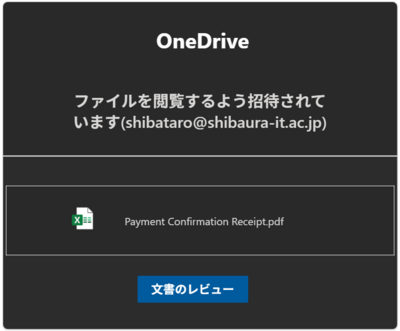
本日下記のようなフィッシングメールが本学あてに送信されて来ています。
件名:
ドキュメント「支払確認領収書.pdf」がOneDrive経由で共有されました
メール本文のリンクはクリックしないようにしてください。
うっかりフィッシングサイトにパスワードを入力してしまった場合は、すぐにパスワードを変更し、最寄りの情報イノベーション課までご連絡ください。
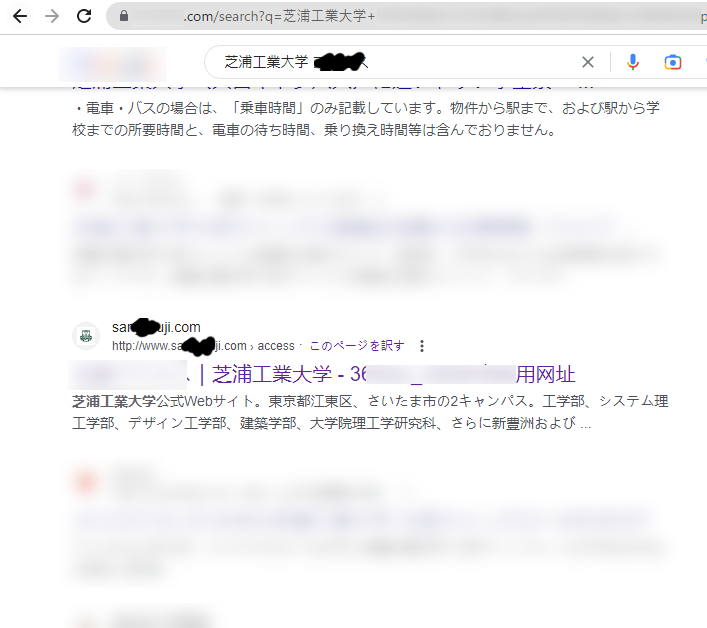
検索サイトから本学に関連するキーワードを検索すると、本学を騙る偽サイトが検索結果に表示されることを確認いたしました。
本件に限らず、最近検索結果に偽サイトが表示されることが散見されます。
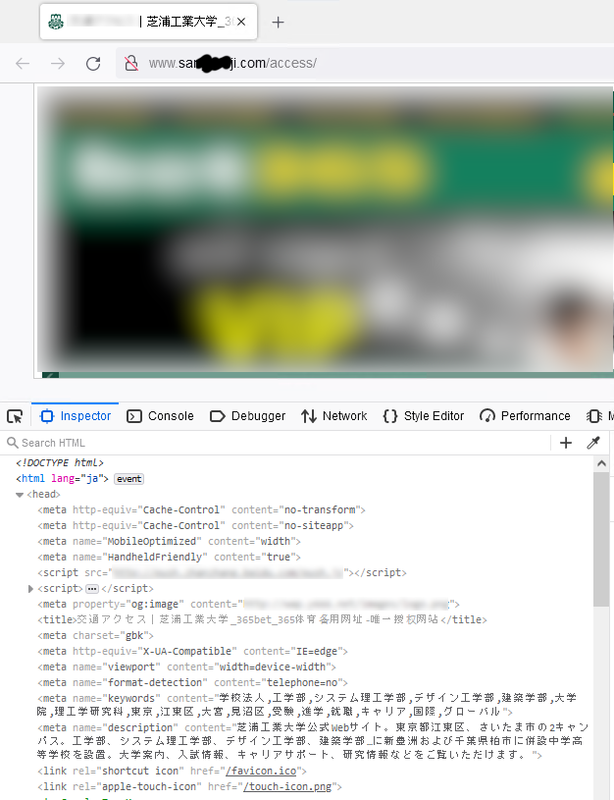
偽サイトの中にはアクセスをするとWebブラウザに感染するものや、マルウエアがダウンロードされるものも存在しますので、常に検索結果に不審なものが含まれていないか確認することを心掛けてください。
また、偽サイトを発見した場合は、SIT-CSIRTまでご報告いただけます様お願いいたします。
SIT-CSIRT
csirt@shibaura-it.ac.jp
We have confirmed that a fake website impersonating our university appears in the search results when you search for keywords related to our university through search engines.
Not only in this case, but also in other recent cases, fake sites have been appearing in search results.
Some of the fake sites may infect web browsers or download malware when accessed, so please be sure to always check your search results for suspicious items.
If you find a fake site, please report it to SIT-CSIRT.
SIT-CSIRT
csirt@shibaura-it.ac.jp
Example of search results
 |
Examples of Fake Sites
 |
Dear students, faculty and staff
This is a notice from the Information Systems Division.
There has been an increase in the number of phishing e-mails sent to you by people trying to defraud you of your account information for commercial Internet services or for the University.
Some of these emails may slip through our email security system and be delivered to you.
Users have reported receiving suspicious e-mails.
If you receive a suspicious e-mail, be careful not to access the URL in the body of the message.
Do not open any attached files.
The sender (From:) is often spoofed and may be the sender's own email address or the administrator's email address (e.g., admin@~).
An example of a subject line: sic.shibaura-it
sic.shibaura-it.ac.jp New Webmail service is now available
mail delivery failure: storage is almost full
ow.shibaura-it.ac.jp mail service update Case ID: ?????
You have [13] pending incoming emails
SYSTEM NOTIFICATION ~ Your 8 unreceived emails are stuck on the sic.shibaura-it.ac.jp Server.
Your ow.shibaura-it.ac.jp Account will be disabled soonest.
Your Outlook storage is full
Verify User
Mail Notice: De-activation
Account Termination
Email Termintaion Request
Undeliverable: Incoming messages failure
Check Password
Email Verification ~ VERIFY YOUR EMAIL ACCOUNT TODAY
~Unknown Login Notification
Password Expiration Notice!
~ Email Notification
Required Action: Email Deactivation Notification for
Required Action: Important Notification for Tuesday, June 27, 2023
Required Action: Important Notification for Monday, June 26, 2023
Required Action: Important Notification for Sunday, June 25, 2023
You have received a new voicemail memo.
Error receiving mail
Notification: Mailbox size has reached quota limit
Sic mailbox size has reached quota limit
Mailbox storage space is low
~ Received Mail Error
Mailbox storage is full, account is suspended
If you receive a suspicious email, please contact SIT-CSIRT.
SIT-CSIRT (Shibaura Institute of Technology Computer Security Incident Response Team)
Email: csirt@shibaura-it.ac.jp
Translated with www.DeepL.com/Translator (free version)

 Another window display
  Manual