2026/02/05 SRAS無線LANで利用している認証サーバの照明証を更新します(2月16日予定)
2026/02/16(月)に、SRAS無線LANで利用している認証サーバのサーバ証明書を更新いたします。
更新後、SRAS無線LANがつながならなくなることがあります。
その場合は、いったん設定を削除の上、再度設定を行ってください。
SRAS無線LANの設定方法に関しましては、こちらをご確認ください。
2026/02/16(月)に、SRAS無線LANで利用している認証サーバのサーバ証明書を更新いたします。
更新後、SRAS無線LANがつながならなくなることがあります。
その場合は、いったん設定を削除の上、再度設定を行ってください。
SRAS無線LANの設定方法に関しましては、こちらをご確認ください。
ご連絡をしていますとおり、2026年1月8日(木)以降、本学アカウント(@shibaura-it.ac.jp)を用いた Google サービスへのログインには、2段階認証の設定が必須となりました。
GmailなどGoogleがリリースしているスマートフォンアプリにログインできている場合は、ご自身で設定を進めることができます。
以下のリンクの「1.スマートフォンをお持ちの方」をご確認いただきながら設定を進めてください。
https://web.sic.shibaura-it.ac.jp/google_2stp_auth
スマートフォンにログインができていない場合、二段階認証の一時無効化が必要になります。
こちらは本人確認が必要なため、メール等でのオンラインでの対応はできかねます。
お手数ですが、学生証または職員証をご持参のうえお近くの情報イノベーション課窓口までお越しください。
窓口にて個別に対応いたします。
2026年1月9日 10時頃~10:25頃まで、学内DNSサーバに障害が発生しておりました。
この影響で、教育研究系ネットワーク(SRAS)、事務系ネットワークにて
名前解決が出来ないことによりインターネット・イントラネット利用が出来ない状態でした。
例)
・ブラウザでWebページにアクセスできない
・Zoom、Microsoft Teams等ネットワークを介したアプリケーションが正常に利用できない
等
※ eduroam無線LANによる接続の場合は問題ありません。
現在は解決しております。
ご迷惑をおかけして申し訳ございません。
2026年度学術情報センター学生スタッフを募集します。
詳細は以下をご覧ください。
豊洲キャンパス・大宮キャンパス共に年末年始期間は閉室いたします。
複合機等の機器は利用可能ですが、用紙・インク補充・その他機器トラブルのサポートができません。
ご了承のほどお願いいたします。
最近、学内ネットワーク(SRAS)上で、spacedesk をはじめとする画面共有ソフトが利用されていることが確認されています。
これらのソフトを学内 Wi-Fi などの共有ネットワーク上で利用すると、同じネットワークにいる第三者から、自分のPC画面がのぞき見されるおそれがあります。
(個人情報、成績情報、研究データ、メール画面 等)
◆学内のみなさまへのお願い
・学内Wi-Fi(SRAS)に接続している状態で、これらのソフトを利用しないでください。
・利用する場合は、自宅など自分だけが使うネットワークに限定し、カフェ等の公衆Wi-Fiでは利用しないでください。
・PC起動時に自動でソフトが起動する設定になっている場合は、自動起動をオフにしてください。
・すでに学内Wi-Fi接続中に利用していた方は、設定の見直しやアンインストール等のご対応をお願いします。
【お問い合わせ先】
学生の方:oshiete@sic.shibaura-it.ac.jp
教職員の方:goiken@sic.shibaura-it.ac.jp
皆さまのご理解とご協力をお願い申し上げます。
2025年11月27日10:40頃より、教研系ファイルサーバに障害が発生しておりましたが、
同日12:10より徐々に復旧を確認しています。ご迷惑をおかけし申し訳ございませんでした。
具体的には以下の障害を確認しています。
・PC教室/一般教室教卓PC利用中にデスクトップが見えなくなる(ファイルが消えたわけではありません)
・PC教室/一般教室教卓PCのサインイン・サインアウトが終わらない
・MyVolumeにアクセスできない
・S*gsotにアクセスできない
(2025/11/27 13:00 更新)
2025年11月26日 12時頃より、大宮キャンパスの仮想基盤の一部ホストにて障害が発生しておりました。
この影響で、一部のサービスに障害が発生しておりました。
現在は復旧しております。
【発生日時】
2025/11/26 12:00頃 ~ 13:30頃
【障害内容】
・PC教室端末および一般教室教師卓から、インターネット接続が出来ない(13:20頃~13:30頃)
・学内のAC区分ソフトウェアのライセンスサーバにアクセスできない
2025年11月21日15:00頃より、教研系ファイルサーバに障害が発生していました。
同日16:30より徐々に復旧を確認しています。ご迷惑をおかけし申し訳ございませんでした。
具体的には以下の障害を確認しています。
・PC教室/一般教室教卓PC利用中にデスクトップが見えなくなる(ファイルが消えたわけではありません)
・PC教室/一般教室教卓PCのサインイン・サインアウトが終わらない
・MyVolumeにアクセスできない
・S*gsotにアクセスできない
(2025/11/21 17:30 更新)
2025年11月20日16:50頃~18:15頃、教研系ファイルサーバに障害が発生しておりました。
現在は復旧しております。
この影響により、以下の障害が発生していました。
・PC教室/一般教室教卓PC利用中にデスクトップが見えなくなる(ファイルが消えたわけではありません)
・PC教室/一般教室教卓PCのサインイン・サインアウトが終わらない
・MyVolumeにアクセスできない
等
(2025/11/20 18:20 更新)
2025年11月19日未明~同日12:15頃まで以下の障害が発生しておりましたが、復旧いたしました。
試験シーズンのところ、この度はご迷惑をおかけし大変申し訳ございませんでした。
(2025年11月19日12:40更新)
2025年11月19日未明より、授業グループに対して、一部の学生のアクセス権が反映されていない問題を確認しております。
現在確認できている対象のユーザおよびグループは、以下の通りです。
対象者
・2025年度入学の学生(学籍番号が25から開始する学生)影響するグループ
・2025年秋タームの上記履修者が所属する授業グループ確認されている問題
・授業録画等、 授業グループを利用してアクセス権を設定しているTeams、 SharePoint、 OneDriveにおける各種ファイル共有にアクセスできない可 能性があります。
・(教員向け) 座席表作成ツールを含むTALENT上の履修者に対象の学生が含 まれていない可能性がありましたが、現在は復旧しております。原因は夜間のバッチ処理に不具合が発生したためであり、本日11月19日(水)3限開始までの復旧を目指し対応中です。12:15頃復旧いたしました。
試験シーズンのところ、この度はご迷惑をおかけし大変申し訳ございません。
2025/12/29 18:30 追記
本メンテナンス作業は完了し、すべてのサービス・ネットワークは復旧しました。
長時間にわたりご不便・ご迷惑をおかけしましたことを
お詫び申し上げますとともに、ご理解・ご協力をいただきありがとうございました。
2025/12/29 15:15 追記
一部サービスを除いて復旧しましたのでお知らせいたします。
復旧していないサービスは以下の通りです。
・SIT Station 復旧しました(18:30)
・施設予約システム 復旧しました(18:30)
・eduroam 復旧しました(16:45)
・印刷システム(一部) 復旧しました(17:55)
ご迷惑をおかけして申し訳ございませんが、復旧まで今しばらくお待ちください。
学生・教職員の皆様
下記日時において、サーバーおよびデータベースのメンテナンスに伴い、サービス・ネットワークが停止いたします。ご不便をおかけいたしますが、ご協力をお願いいたします。
作業日時: 2025/12/27(土) ~ 2025/12/28(日) 終日
作業日時: 2025/12/27(土) ~ 2025/12/29(月) 終日 (作業の都合により延長しました)
作業箇所: 豊洲・大宮・白井データセンター
影響: 全てのサービス・ネットワークが停止します。
インターネットへの接続
DNSサービス
学内無線LAN、eduroam
SRAS VPNサービス
メールの送受信(Gmail含む)
クラウドサービスへのログイン (Microsoft 365、Zoom、Adobe等)
印刷システム
PC教室
業務系システム
等
※ 作業の進捗状況により終了時間は前後します。
学生・教職員の皆様
下記日時において、ネットワーク機器のメンテナンスに伴い、ネットワークが停止いたします。ご不便をおかけいたしますが、ご協力をお願いいたします。
2025/9/21(日) 18:00~21:00
作業箇所: 白井データセンター
影響:インターネットへの接続が断続的に停止します。
※ 作業の進捗状況により終了時間は前後します。
Dear Students, Faculty, and Staff,
This is a notice from the Information Innovation Section.
We sincerely apologize for the concern and inconvenience caused by the recent incident of unauthorized access that resulted in a personal information leak.
To strengthen our security measures against unauthorized access, Multi-Factor Authentication (MFA) will become mandatory as of October 1, 2025.
Please review the setup manual below and complete the configuration in advance.
Microsoft 365 MFA Setup Manual:
https://web.sic.shibaura-it.ac.jp/ms_mfa?lang=en
In preparation for the MFA requirement, the ADFS login screen will be partially modified starting today. Please refer to the following guide for usage instructions.
Microsoft 365 MFA Usage Guide:
https://web.sic.shibaura-it.ac.jp/ms_mfa_usage?lang=en
Contacts
Students: oshiete@sic.shibaura-it.ac.jp
Faculty and Staff: goiken@sic.shibaura-it.ac.jp
We appreciate your understanding and cooperation.
利用手続きの簡素化、セキュリティ強化等を目的に、2025年9月以降(※)、学認サービスのログイン方法を変更いたします。
(※)2025年9月3日のメンテナンス終了後より、新しいログイン方法に切り替わります。
これまで必要だったAMIでの利用申請や学認用パスワードは不要となり、今後は ScombZなどと同じWindows/ADFSパスワードでのログインが可能になります。
ーーーーーーーーーーーーーーーーーーーーーーーーーーー
【これまで】
1.AMIで利用申請・学認用パスワードの登録
2.学認対応サービスに、学認用パスワードでログイン
↓
【変更後(2025年9月3日以降)】
1.学認対応サービスに、Windows/ADFSパスワードでログイン
(詳細な手順は学術情報センターのマニュアルをご確認下さい)
https://web.sic.shibaura-it.ac.jp/login_gakunin
ーーーーーーーーーーーーーーーーーーーーーーーーーーー
また今回の変更に伴い、下記の日時でメンテナンス作業を実施します。
作業中は対象のサービスが一時的にご利用いただけません。ご不便をおかけいたしますが、ご理解とご協力をお願いいたします。
◆日時
・2025年9月3日(水)18:00 ~ 18:15(予定)
※切り替え作業完了後は、新しいログイン方法となります。
◆作業内容
・ログイン変更のためのサーバー切り替え作業
◆影響を受けるサービス
・学認対応サービス(Science Direct、CiNiiなど) https://web.sic.shibaura-it.ac.jp/page_20191224041441
・MATLABへのサインイン ※既にサインイン済みの方は、継続してご利用いただけます。
◆お問い合わせ先
・教職員:goiken@sic.shibaura-it.ac.jp
・在学生:oshiete@sic.shibaura-it.ac.jp
下記のとおり、サーバメンテナンス作業に伴い、学認サービスを一時的に停止いたします。
皆さまにはご不便をおかけいたしますが、ご理解とご協力のほど、よろしくお願い申し上げます。
◆メンテナンス作業の目的
・学認サーバのバージョンアップに関する動作検証
・認証の仕組み(ログイン方法)の切り替えに関するテスト
◆停止予定日時
・2025年7月30日(水)16:00 ~ 19:00
・2025年7月31日(木)16:00 ~ 19:00
・2025年8月2日(土)16:00 ~ 19:00 ※予備日
◆影響範囲
上記時間帯は、以下のサービスが一時的にご利用いただけなくなります。
・学認対応サービス(Science Direct、CiNiiなど) https://web.sic.shibaura-it.ac.jp/page_20191224041441
・MATLABへのサインイン ※既にサインイン済みの方は、継続してご利用いただけます。
◆ ご注意事項
・メンテナンス中に対象サービスへアクセスしようとすると、普段とは異なるログイン画面が表示されることがあります。誤って操作すると、正しくサービスが使えない可能性がありますので、メンテナンス時間中は対象サービスへのアクセスをお控えください。
・今後、学認サービスへのログイン方法が変更となる予定です。変更内容については、別途ご案内いたします。
◆お問い合わせ先
・教職員:goiken@sic.shibaura-it.ac.jp
・在学生:oshiete@sic.shibaura-it.ac.jp
ひまわりタームのPC教室の閉室および窓口業務についてのお知らせです。
●対象期間
・2025/7/26(土) ~ 2025/9/26(金)
対象期間中の一斉休暇期間(全日閉室)
2025/8/8(金) ~ 2025/8/18(月)
●PC教室について
・開室日時
(豊洲) 月~金 9時 ~ 20時
(大宮) 月~金 9時 ~ 20時30分
※一斉休暇期間中(8/8-8/18)は除く
・閉室日
土/日/一斉休暇期間(8/8-8/18)
※ 廊下等に設置された複合機やプロッタの利用は可能ですが、用紙補充やその他トラブル発生時のサポートは一切ありません
※ 閉室日に関しては、セルフ利用もできません
●利用可能教室
・豊洲:教室棟6F PC実習室6
・大宮:5号館1F 情報処理教室
※教室利用予約がある日は別教室となる可能性があります
●窓口対応時間
・(豊洲) 9時 ~ 20時
・(大宮) 9時 ~ 17時 ※5号館窓口のみ
※PC教室開室日のみ対応します
何卒ご理解・ご協力のほどよろしくお願いいたします。
学生・教職員の皆様
下記日時において、ネットワーク機器の入れ替え作業に伴い、ネットワークが停止いたします。ご不便をおかけいたしますが、ご協力をお願いいたします。
2025/8/8(金) 12:30~13:00
作業箇所: 白井データセンター
影響:インターネットへの接続が断続的に停止します。
2025/8/8(金)~2025/8/11(月)
作業箇所: 豊洲キャンパス各フロア
影響: ネットワークが停止します。 (法定停電)
※ 作業の進捗状況により終了時間は前後します。
現在、本学MATLABのポータルサイトを含め、MATLABのオンラインシステムの一部に問題が発生しております。
復旧までお待ちくださいますようお願いいたします。
状況につきましては以下ページでご確認いただけます。
https://status.mathworks.com/
【2025/06/06追記】
MathWorks社の障害は全て解消し、現在は正常にサービスをご利用頂けます。
ご利用の皆様にはご不便をおかけし申し訳ございませんでした。
現在、豊洲固定電話の外線の発着信ができません。
原因が断定できておりませんが、光電話回線の問題かNTT局側の機器の問題の可能性が高いです。
復旧は、17時を超える見込みとなっております。
固定電話復旧しました。
ご迷惑をおかけいたしました。
以下の障害が発生していましたが、2025/05/21(水)17:30頃 不通となっていたキャンパス間ネットワークはすべて復旧いたしました。
2025/05/20 22:37頃より、アルテリアネットワークス網において大規模障害が発生しております。
この影響で、
・豊洲キャンパス ~ 大宮キャンパス
・豊洲キャンパス ~ 白井データセンター
・大宮キャンパス ~ 柏中学高等学校
・附属中学高等学校 ~ 柏中学高等学校
・白井データセンター ~ SINET6
間の回線が不通となっており、豊洲キャンパス、附属中学高等学校、柏中学高等学校からのインターネット接続、
及び事務系ネットワークが不通となっております。
また、各種サービスが利用できない障害が発生しております。
ご利用の皆様にはご不便をおかけして申し訳ございませんが、復旧までしばらくお待ちいただけます様お願いいたします。
(2025/05/22 11:20更新)
学生・教職員の皆様
学術情報センターより、本学で包括契約しているAdobe社製品に関するセミナーのご案内です。
タイトル: 全部見せます!サクッと学ぶCreative Cloudのアプリとサービス
日時: 2025/5/28(水) 18:30~20:00 (オンライン)
費用: 無料
【概要】
Creative Cloudに含まれる20数種類以上のアプリの全て、
特に今話題の直感的な操作で簡単にビジュアルコンテンツが作れるAdobe Express、
商用利用も可能な画像生成AIのAdobe Fireflyを一挙にご紹介します。
「最新のCreative Cloudの機能を学んで制作活動に役立てたい」
「Creative Cloudを授業や課外活動で使ってみたい」
「活用できていないアプリがある」
そんなお声におこたえする「全部見せます!」セミナーです。
【内容】
Creative Cloud のアプリケーションとその特徴をご紹介
Adobe Express と Adobe Firefly のご紹介
大学・企業事例のご紹介
【 対象】
大学・専門学校の教職員の皆さま、学生の皆さま
【お申込専用サイト】
ScombZよりお知らせしたURLよりお申し込み下さい。
※当日ご都合がつかない方におきましても、お申込みいただきますとアーカイブ配信を御覧いただけます。
2025/05/16(金)に、eduroam 認証サーバのサーバ証明書を更新いたします。
ユーザ端末から最初にeduroamに接続した際、更新後の証明書を信頼するように求められることがあります。
以下の情報を確認の上、接続を行ってください。
発行先:edrad.sic.shibaura-it.ac.jp
発行元:NII Open Domain CA - G7 RSA
サーバーの拇印:6b 12 58 6f 18 96 10 64 4f 38 4b 24 73 89 b6 c4 6f 14 19 49
eduroamの利用方法についてはこちらのページをご確認下さい。
日時
2025年4月28日(月)~5月7日(水)
詳細
以下の期間では、開室時間が通常と異なります。
期間:4/28~5/7
| 日付 | 授業 | 窓口 |
| 4月28日(月) | 通常授業 | 〇 |
| 4月29日(火) | 休講(昭和の日) | × |
| 4月30日(水) | 休講 | × |
| 5月1日(木) | 休講 | × |
| 5月2日(金) | 休講 | × |
| 5月3日(土) | 休講(憲法記念日) | × |
| 5月4日(日) | 休講(みどりの日 ) | × |
| 5月5日(月) | オンデマンド授業日(こどもの日) | × |
| 5月6日(火) | 授業日(振替休日) | 〇 |
| 5月7日(水) | 通常授業 | 〇 |
上記のとおり、ゴールデンウィーク期間中は、一部日程(4月29日~5月5日)で閉室となっております。
ご不便をおかけいたしますが、あらかじめご確認のうえ、ご利用くださいますようお願いいたします。
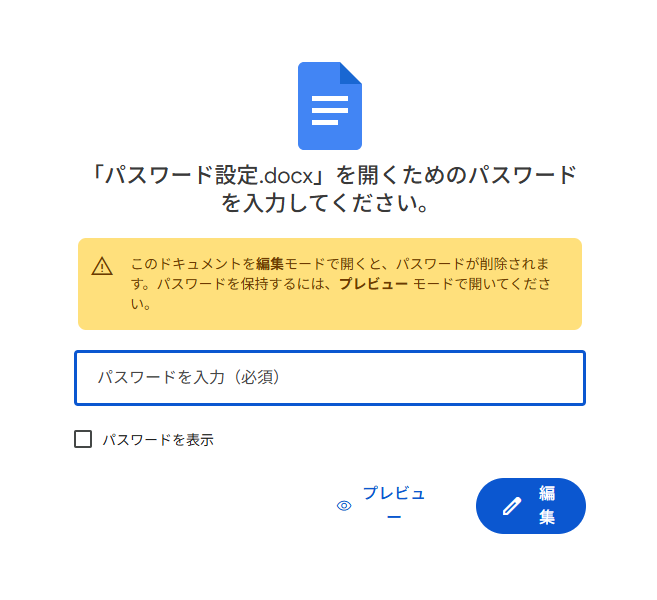
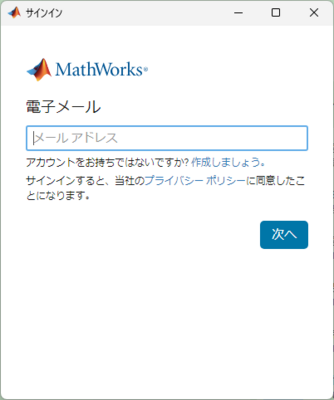
PC教室のMatlabの起動に、Mathworksアカウントが必要になりました。
以下のような画面が出力されるため、
Mathworksアカウントでログインしてください。
MathWorksアカウントの作成方法は以下のマニュアルに記載があります。
※利用方法に記載されている 1と2をご査収ください。
2025/03/04 OneDriveマウントポイント(テナント名)変更について
2025年3月より、OneDriveのマウントポイント(テナント名)を変更いたします。
例】アプリを利用して、OneDriveをマウントした場合
表示名:
旧 "FirstName - 芝浦工業大学 教研テナント(SIC)"
新 "FirstName - SIT"
パス名:
旧 C:\Users\<ユーザのアカウント名>\OneDrive - 芝浦工業大学 教研テナント (SIC)
新 C:\Users\<ユーザのアカウント名>\OneDrive – SIT
※すでにマウントしている場合は、一度アンマウントすることで、表示が変更いたします
平素より一般教室教卓内端末及びPC教室端末をご利用いただき、誠にありがとうございます。
マイクロソフト社によるWindows 10のサポート終了(2025年10月14日)を受け、セキュリティ対策および安定したシステム環境を維持するため、下記対象端末のOSバージョンをWindows 11へ切り替えます。ご利用の皆様には、ご理解とご協力のほど、何卒よろしくお願い申し上げます。
【対象端末】
・一般教室教卓内端末
・PC教室端末
・その他非常勤講師室等に設置している端末
【完全切り替え日】
・2025年3月25日(火)
※完全切り替え日以降はWindows11のみ起動可能となります。
【Windows10、Windows11 平行稼動期間】
・2025年3月11日(火)~ 2025年3月24日(月)
※上記期間中は、対象端末をWindows 10またはWindows 11のどちらでも起動可能なデュアルブート環境に設定いたします。PC起動時に「起動イメージ選択」メニューが表示されますので、Win10もしくはWin11を選択して起動することが出来ます。Windows 11の操作感をお試しいただき、ご意見がございましたら情報イノベーション課までお寄せください。
【その他】
・Windows11でも従来のWindows10と同様にA区分ソフトウェアおよびC区分ソフトウェアをご利用頂けます。
※B区分ソフトウェアは周知のとおり原則廃止とし、インストールを行いません。B区分ソフトウェア一覧
・平行稼動期間では一部のソフトウェアのバージョンは2024年度版となります。4月1週目以降に順次2025年度版へアップデートを行います。
【お問い合わせ先】
・情報イノベーション課(goiken@sic.shibaura-it.ac.jp)
2025年度学術情報センター学生スタッフを募集します。
詳細は以下をご覧ください。
2024年12月20日(金) 夕方頃より、学外から本学へのメール配送および各種サービスについて、サーバトラブルのため障害が発生しております。
障害状況: 2024/12/20(金) 夕方頃より、20214/12/23(月) 午前中頃まで、学外から本学宛のメールの配送遅延、未着、送信元への未配送メールが発生しています。
原因: 海外より大量のスパム・フィッシングメールが送られてきたことにより、本学メールサーバーの処理能力を超えたため、メールサーバーが一杯となり、新規メールの受取拒否や配送遅延が発生しています。
2024/12/23 午前中より、徐々に解消をしてきており新規に送信されたメールにつきましては、概ね受信できるようになっておりますが、障害の期間に送信された一部のメールにつきましては、届かない場合、送信者にエラーメールが送信場合、遅れて届く場合がございます。
ご利用の皆様におかれましては、本来届くメールが届いていない可能性があることにご留意願います。
(2024/12/25 17:00更新)
現時点で障害の発生していたメールサーバ上から復旧できるメールにつきましては、配送済みとなっております。本来届く予定のメールが届いていない場合は、送信元にお問い合わせください。
ご迷惑をおかけして申し訳ございません。
本件に関しての問い合わせは、以下までお願いいたします。
教員:goiken@sic.shibaura-it.ac.jp
学生:oshiete@sic.shibaura-it.ac.jp
12月20日(金)より、サーバに障害が発生しており、メールの配送に大幅な遅延が発生しております。
サーバ自体の復旧はしておりますが、本日からのメールが順次配送されていくため、しばらくメール配送に遅れが出る見込みです。
皆さまにはご迷惑をおかけして申し訳ございません。
本件に関しての問い合わせは、以下までお願いします。
教員:goiken@sic.shibaura-it.ac.jp
学生:oshiete@sic.shibaura-it.ac.jp
12月8日(日)より、サーバに障害が発生しており、メールの配送に大幅な遅延が発生しております。
サーバ自体の復旧はしておりますが、日曜日からのメールが順次配送されていくため、しばらくメール配送に遅れが出る見込みです。
皆さまにはご迷惑をおかけして申し訳ございません。
本件に関しての問い合わせは、以下までお願いします。
教員:goiken@sic.shibaura-it.ac.jp
学生:oshiete@sic.shibaura-it.ac.jp
学祭期間中のPC教室は大宮・豊洲共に以下の通りです。
芝浦祭準備日: 10月31日(木)~11月1日(金) 通常開室
芝浦祭当日: 11月2日(土)~11月4日(月) 閉室
芝浦祭片付日: 11月5日(火)~11月6日(水) 通常開室
本日メールサーバーの1台に障害が発生しており、一部メールの配送に大幅な遅延が発生しております。
皆さまにはご迷惑をおかけして申し訳ございません。
本件に関しての問い合わせは、以下までお願いします。
教員:goiken@sic.shibaura-it.ac.jp
学生:oshiete@sic.shibaura-it.ac.jp
※ 障害は9/11深夜に概ね解消いたしました。ご迷惑をおかけして申し訳ございませんでした。
学生・教職員の皆様
9月24日(火)に、Adobeの大学向けセミナーが開催れます(オンライン)
視聴をご希望の方は、申し込みサイトよりご登録をお願いいたします。
当日視聴できなくても、登録をしておくと後日アーカイブ配信をご覧いただけます。
【セミナータイトル】
<全部見せます!サクッと学ぶ Creative Cloud のアプリとサービス>
【開催日時】
9月24日(火)18:30~20:00
【対象】
・教職員の皆さま
・学生の皆さま
【お申込専用サイト】
(8/28にScombZより発信したお知らせをご覧ください)
※当日ご都合がつかない場合でも、お申込みいただきますとアーカイブ配信をご覧いただけます。
【概要】
Creative Cloudに含まれる20数種類以上のアプリの全て、特に今話題の直感的な操作で
簡単にビジュアルコンテンツが作れるAdobe Express、商用利用も可能な画像生成AIの
Adobe Fireflyを一挙にご紹介します。
「最新のCreative Cloudの機能を学んで制作活動に役立てたい」
「Creative Cloudを授業や課外活動で使ってみたい」
「活用できていないアプリがある」
そんなお声におこたえする「全部見せます!」セミナーです。
今後のセミナー開催予定
9/24(火)18:30-20:00 全部見せます!サクっと学ぶ Creative Cloudのアプリとサービス
10/9(水)18:30-19:30 3Dの最新活用事情~Adobeの最新技術とともに新しい利用方法や業界のトレンドをご紹介~
10/17(木)18:30-19:30 Adobe Express~役立つビジュアルコンテンツを作成してみよう~ 学生・職員様向け
10/24(木)18:30-19:30 Adobe Express~画像生成AI機能を使ってクリエイティブをアウトプットしてみよう~ 教職員様向け
11/6(水)12:00-13:00 PDF活用による校務・教務の効率化
夏期休み期間のPC教室の閉室および窓口業務についてのお知らせです。
●夏期期間
・2024/8/1(木)~2024/9/27(金)
●PC教室開室に関して
・月~金 9時~20時半 開室
・土・日 閉室
※ 廊下等に設置された複合機やプロッタの利用は可能ですが、用紙補充やその他トラブル発生時のサポートは一切ありません
※閉室日に関しては、セルフ利用もできません
●窓口対応時間
・開室時間に準拠 (豊洲)
・9時~17時 (大宮)
●一斉休暇期間
・以下の期間に関しては、全日閉室
2024/8/8(木)~2024/8/18(日)
※セルフ利用もできません
何卒ご理解・ご協力のほどよろしくお願いいたします。
本日eduroam 認証サーバのサーバ証明書を更新いたします。
ユーザ端末から最初にeduroamに接続した際、更新後の証明書を信頼するように求められることがあります。
以下の情報を確認の上、接続を行ってください。
発行先:edrad.sic.shibaura-it.ac.jp
発行元:NII Open Domain CA - G7 RSA
サーバーの拇印:ba 5d 5f 7f dc 06 19 84 ea da 55 f2 c1 b5 6c cd db 83 56 69
eduroamの利用方法についてはこちらのページをご確認下さい。
学内DBサーバ更新作業の影響で、現在一部のユーザにてStationログインエラーが発生しております。
以下のメッセージが表示される場合、お手数ですがブラウザのキャッシュをクリア、もしくはプライベートウィンドウを使用してのログインをお試し下さい。
Couldn't get your session object. Please contant to system administrator.
※上記方法でログイン出来ない場合でも、何度か繰り返すことでログイン出来ます。
ご利用の皆様にはご不便をおかけいたしますが、何卒よろしくお願いいたします。
eduroamサーバの入れ替えに伴い、学内・学外でeduroamサービスが利用できない時間帯が発生いたします。
利用停止時間:3/16(土) 12:00-13:00の間で10分程度
ご利用の皆様にはご不便をおかけいたしますが、何卒よろしくお願いいたします。
各キャンパスでは、土曜日は情報イノベーション課の窓口閉室後も
以下の時間帯でPC実習室を利用することができます。
大宮キャンパス 5号館1F 情報処理教室 17時~20時30分
豊洲キャンパス 教室棟6F PC実習室6 17時~20時30分
詳細につきましてはこちらのページをご確認ください。
PC実習室時間外利用
学内者向けの短縮URL及びQRコード作成サービスを用意いたしましたので、ご活用ください。
学内者向け短縮URLサービス
https://surl.sic.shibaura-it.ac.jp/
利用マニュアル:
https://web.sic.shibaura-it.ac.jp/surl
短縮URLサービスとは、長いURLを別の短いURLを使ってアクセスできるようにするものです。
安易に外部の無料短縮URLサービス・QRコード生成サービスを使用しすると、意図しない悪意のある広告が表示されたり、当初設定したURLとは違うサイトに飛ばされるといったトラブルが発生する場合がありますので、
極力、本サービスをご利用いただけますようお願いいたします。
アドビデジタルクリエイティブ基礎講座のコンテンツが更新されました。
https://adobedcc.sic.shibaura-it.ac.jp
更新の内容は以下の通りです。
<動画>
【追加】
・デジタルクリエイティブ基礎_104【講義】生成AI
・デジタルクリエイティブ基礎_231【演習】構成:Express:デザイン生成
・デジタルクリエイティブ基礎_417【演習】造形:Illustrator:ベクター生成
・デジタルクリエイティブ基礎_418【演習】造形:Illustrator:モックアップ
・デジタルクリエイティブ基礎_624【演習】画像処理:Photoshop:生成塗りつぶし
・デジタルクリエイティブ基礎_625【演習】画像処理:Photoshop:生成拡張
<講義資料>
すべてアップデート
<演習素材>
【追加】
・600画像処理 ウィペット
・600画像処理 レタッチ
※English follows Japanese
2023年度卒業・修了生の皆様
(内部進学者除く)
情報イノベーション課です。
本メールは学情センターで提供しているサービスの、
卒業・修了後の利用可否に関する重要なお知らせですので、必ず最後までご一読下さい。
※2024年より進学しても、今のアカウント名をそのままご利用いただけることになったため、来年度に内部進学する方は、こちらのメールは読み飛ばしていただいて構いません。
[内容]
システム関連の年次更新作業を以下の日程で予定しています。
大学院:2024年3月19日(火)午前中より
学部:2024年3月22日(金)午前中より
この年次更新にともない、学術情報センターのアカウントが停止となるため、現在、ご利用しているサービスのほとんどが、利用不可になります。
卒業後も利用できるサービスは以下の通りです。
▼Gmail
GoogleDriveを始めとした、Gmail以外のサービスはすべて利用できなくなります。
また、卒業後はAMIにログインできなくなりますので、
自身で、Googleのパスワードが変更できるよう、
電話番号や個人のメールアドレスの登録をおすすめいたします。
登録方法は以下の通りです。
https://support.google.com/accounts/answer/3463280?hl=ja&co=GENIE.Platform%3DDesktop&oco=0
利用できなくなるサービスに関しましては、以下のURLよりご確認いただけます。
https://web.sic.shibaura-it.ac.jp/3554126bda3ed7e7df6a785c1552bee2/page_20190704013357
[問い合わせ先]
情報イノベーション課
mail: goiken@sic.shibaura-it.ac.jp
--------------------------------------------------------------------------
For Students who are scheduled to graduate in March, 2024.
This is the Information Innovation Division.
This is an important notice regarding the services provided by SIT Center for Science Information.
Please be sure to read it through to the end.
[Contents]
We have scheduled the following dates for annual system-related updates.
Graduate : From the morning of Tuesday, March 19, 2024
Undergraduate : From the morning of Friday, March 22, 2024
With the annual update, most of the services you are currently using will be unavailable as your SIT account will be suspended.
The services that will remain available to you after graduation are as follows
▼ Gmail
All services other than Gmail, such as Google Drive, will become unavailable.
Additionally, after graduation, you will not be able to log in to AMI.
Therefore, we recommend registering your phone number or personal email address,
so that you can change your Google password by yourself.
The registration process is as follows:
https://support.google.com/accounts/answer/3463280?hl=en&co=GENIE.Platform%3DDesktop&oco=0&sjid=7639759867285959034-AP
For services that will become unavailable, please check the following URL.
https://web.sic.shibaura-it.ac.jp/3554126bda3ed7e7df6a785c1552bee2/page_20190704013357?lang=en
If you have any questions, please contact us at the following address
Faculty: goiken@sic.shibaura-it.ac.jp
Students: oshiete@sic.shibaura-it.ac.jp
2024年1月10日に発生した、GoogleDriveおよびPhotoにて起こった障害の顛末を記載いたします。
今回の障害は、GoogleWorkspace for Education Plusの更新作業において発生いたしました。
2024年1月3日
ベンダーにより契約更新作業が行われたが、
エラーが発生したため、Googleに問合せ。
原因確認のため、グレースプラン(暫定プランに)へ変更を提案された後、適用
2024年1月10日
本学担当者にトークン発行の依頼があったものの、
7日間過ぎたためグレースプランは切れ、障害が発生
数時間後、グレースプランが延長され、暫定的に解決するも、
エラーの特定はできず。
2024年1月15日
ライセンスが発行され、障害が解消。
2024年1月30日(火)で募集を終了いたしました。
ご応募ありがとうございました。
2024年度学術情報センター学生スタッフを募集します。
詳細は以下をご覧ください。
学情バイトFAQ(順次UPされます)
冬季休み期間のPC教室の閉室および窓口業務についてのお知らせです。
●冬季休み期間
・2023/12/26~2024/01/08
●PC教室開室に関して(実習室・講義室)
・全室閉室
※セルフ利用および入出力室の24時間利用も無し(休日含む)
※ 廊下等に設置された複合機やプロッタの利用は可能ですが、用紙補充やその他トラブル発生時のサポートは一切ありません
●窓口対応時間
・期間中:なし
●カレンダーURL
https://web.sic.shibaura-it.ac.jp/calendars/calendars/index/?frame_id=435&style=largemonthly
ご利用者の皆様には、ご不便をおかけいたしますが、何卒ご理解・ご協力のほどよろしくお願いいたします。
アプリ開発アルバイトの募集をいたします。
詳細は、情報イノベーション課窓口に掲載してあるポスターをご覧ください。
※ 応募受付期間 2023/12/1(金)~2023/12/20(水)
2023年11月10日(木)、6時30分頃、豊洲キャンパスの仮想基盤にてストレージ容量が不足となり、無線LAN接続や、ScombZへのログイン、プリントシステムが利用できない等、多岐に渡って障害が発生いたしました。
確認後、順次復旧作業をすすめ、同日午前中にインフラ系のほぼ全てのサービスが復旧しています。
その他のサービスにつきましても、同日夕方までに概ね全てのサービスが復旧いたしました。
ご利用の皆様にはご迷惑おかけしてしまい大変申し訳ございませんでした。
During the following date and time, there was a problem with sending and receiving e-mails.
The e-mails sent from our university were being identified as SPAM depending on the e-mail system used by the recepient.
Please be aware that when an e-mail is marked as SPAM, an error message may or may not be returned to the sender.
For e-mails to the University, those who use Outlook Online (Exchange) (a part of faculty and staff) are receiving error messages back to the sender, while Gmail(student, a part of faculty and staff) is not affected.
Occurrence date and time of the outage:
From 10:30 am to 5:30 pm on 8/19/2023 (JST)
Reason for the problem:
Due to a failure of the spamhaus project, which provides a list of SPAM email sending sites, our University's mail server was incorrectly registered, and mail systems such as Outlook Online, which uses spamhaus, detected it incorrectly.
The following schedule is for switching the core database of the University and replacing the network equipment.
8/9-14 All day Services that use the core database (subject to change as described below)
8/10 10:00-13:00 (scheduled) All networks inside and outside the university will be shut down. *Communication will be restored as soon as the work is completed.
During this period, various services will be unavailable.
Please be advised in advance.
|
【Systems subject to the core database】 ・All administrative systems (approval requests, part-time job management, facility reservations, faculty performance, SGU agenda sheets, etc.) ・ScombZ |
From 7/31/2023, the wireless LAN will be upgraded at the Toyosu and Omiya campuses.
The scope of work and scheduled dates are as follows.
Please be advised that wireless LAN will be unavailable during the work period.
In addition, some laboratories, experimental rooms, and office rooms will be entered in order to replace wireless LAN equipment.
In rooms where wireless LAN APs are installed on the ceiling, we may ask you to move the fixtures during the work.
We apologize for any inconvenience this may cause and ask for your understanding and cooperation.
Toyosu
| work day | area |
| 7/31(Mon) | Research Building 10F, Research Building 9F |
| 8/1(Tue) | Research Building8F (Except library heights), Research Building7F, Research Building6F |
| 8/2(Wed) | Research Building5F(Except the office), Research Building4F |
| 8/3(Thu) | Research Building3F(Except the office), Research Building2F(Except the office) |
| 8/4(Fri) | Research Building1F, Classroom Building1F(Except beside the escalator), Multi-activity Building1~6F, under central the stairs |
| 8/9(Wed) | Library(heights), The office at Research Building5F, The office at Research Building3F, The office at Research Building2F, The office at Classroom Building2F, The office at Classroom Building1F(Beside the escalator) |
Omiya
| work day | area |
| 8/21(Mon) | Building No.6 |
| 8/22(Tue) | research organization for advanced engineering S.I.T. building |
| 8/23(Wed) | Building No. 5 Extension 2~5F |
| 8/24(Thu) | Gymnasium, Former air purification building, Animal breeding and storage facilities |
| 8/25(Fri) | 1st Clubhouse |
| 8/28(Mon) | 2nd Clubhouse, 3rd Clubhouse, guard station, North Gate |
Please check the following link.
Home > Contact Us > 質問集(FAQ)
FAQ: I received an email invitation from a Microsoft365 group.
Students and Faculty
This is a notice from the Information Systems Division.
At the following date and time, we will perform maintenance work on FileServer due to the replacement.
File services including access to MyVolume cannot be used during working hours.
We apologize for the inconvenience, but we ask for your cooperation.
Date: 2023/05/21 (Sun) 09:00-12:00
Work location: FileServer stop
Stop services:
・All MyVolume services (including access via SRAS)
・Log in to Linux
・Scanning service on the print system (MyVolme transfer)
・ShareFolder service
Contact
(Faculty): goiken@sic.shibaura-it.ac.jp
(Student): oshiete@sic.shibaura-it.ac.jp
2023/5/8-9
On May 8, the storage space usage of the Toyosu virtualization platform at Toyosu reached 100% and some servers were shut down.
As a result, various services were unavailable.
We have confirmed that most of the services have been restored as of now (May 9, 10:00),
but if you find any services that are experiencing problems, please contact the Information System Section.
[List of failed services](5/9 10:15 update)
S*gsot
Linux server(yli)
Wireless LAN(SRAS/eduroam)
SIT STATION
AMI
Certificate issuing machine(PAPYRUS MATE)
Gakunin
Wing-net(at Toyosu)
DHCP(partially)
DNS(partially)
Office support system(Office portal)
Office system menue
Debt system( including source system)
Print server(for office)
Application for card issue
Apr. 10-11, 2023
There was an intermittent problem with the wireless LAN at the Omiya Campus.
Countermeasures to load access points are being taken sequentially.
Dear Students,
This is an announcement from the Information Network Service Section.
We are pleased to announce the release of ScombZ's mobile application, "ScombApp", for iOS and Android!
We hope it will help you to enhance your student life.
Up until now, you had to touch your student ID card at the entrance of the campus to imprint your arrival and departure from school,
From now on, please use this app to imprint your ID.
(You can also use your student ID card for imprinting. If you do not have a smart phone or have forgotten your smart phone, please use the faculty/staff imprinting machine.)
※Your smartphone must be connected to the campus wireless LAN (SRAS2G/SRAS5G/SRAS-WPA/eduroam).
iOS Version
https://apps.apple.com/jp/app/scombapp/id1669657083
Android Version
https://play.google.com/store/apps/details?id=jp.ac.shibaura_it.sic.scombmobile
For more information on ScombApp, please visit the following introduction page
https://web.sic.shibaura-it.ac.jp/scombmobile
There is a problem with MoSICA for iOS in which the correct one-time passwords are not output
(This seems to occur on devices with a specific version of iOS or later).
This problem will be resolved by updating MoSICA.
If the one-time password still does not pass, please refer to the attached file and update MoSICA.
※If you are currently using iOS 11 or earlier, you may not be able to use the service after updating. Please be aware of this.
For Students who are scheduled to graduate in March, 2023
From the Information Network System Division.
This is an important notice regarding the services provided by SIT Center for Science Information.
Please be sure to read it through to the end.
[Contents]
We have scheduled the following dates for annual system-related updates.
Graduate : From the morning of Wednesday, March 22, 2023
Undergraduate : From the morning of Friday, March 24, 2023
With the annual update, most of the services you are currently using will be unavailable as your SIT account will be suspended.
The services that will remain available to you after graduation are as follows
▼Gmail
※All services except for email, including GoogleDrive, will not be able to use
You can check the services you will not be able to use at the following URL.
https://web.sic.shibaura-it.ac.jp/3554126bda3ed7e7df6a785c1552bee2/page_20190704013357?lang=en
[Notes]
◆About Student ID Card
You will not be able to use any services using your student ID card, such as entering or exiting by Akerun, or print using a multifunction printer or plotter.
◆About personal data
All data stored in My Volume, OneDrive, GoogleDrive, etc. will be deleted.
Please back up all necessary data by yourself before the annual update.
※After your account is suspended, you will not be able to access your data.
We will not be able to support requests for data recovery.
If you are unable to back up your data in time for the above date, please be sure to contact us in advance.
◆About Site Licensing Software
Please be sure to uninstall the site license software you are using.
◆Micorosoft account
If you are using your Micorosoft account (xxxxxx@sic.shibaura-it.ac.jp) to login your PC, your account will be suspended and you will not be able to login.
※If you only have a Microsoft account on campus, you will have no way to login to your PC and will be forced to initialize it.
Also, if you have saved your BitLocker recovery key to your university account (@sic.shibaura-it.ac.jp), you will not be able to check it either, so please change your backup location.
If you have any questions, please contact us at the following address
Faculty: goiken@sic.shibaura-it.ac.jp
01/25/2023 16:30~
Microsoft365 is experiencing disability.
01/25/2023 23:31
The system has been restored.
The application period ended on Monday, January 30.
Thank you for your application.
Applications are now being accepted for Academic Information Center student staff for 2023.
For more information, please see below.
Office Work: Application Guidelines [PDF]
Lab Work: Application Guidelines [PDF]
Part-time job FAQ (to be updated in due course)
We experienced an Azure outage during the winter break.
The system has now been restored.
We apologize for any inconvenience this may have caused to ScombZ.
Date of Occurrence:
Approximately 12/30/2022 to 10:30am on 01/01/2023
Scope of impact: Uploading and downloading of attached files such as educational materials and assignments in ScombZ LMS
Cause:
File access errors due to storage mount failure caused by Azure failure or maintenance. The error was caused by a storage mount failure due to an Azure failure or maintenance. Normally, the storage is automatically mounted after a failure, but for some reason it was not remounted. However, for some reason, it was not remounted.
Recovery method:
Remount on the CITS side and restart the service.
Translated with www.DeepL.com/Translator (free version)
Announcement of PC classroom closure and window service during winter vacation
※No self-use and no 24-hour use of input/output rooms (including holidays)
※Multifunctional machines and plotters installed in the hallways are available for use, but there is no support for paper refilling or other problems.
https://web.sic.shibaura-it.ac.jp/calendars/calendars/index/?frame_id=435&style=largemonthly
We apologize for any inconvenience this may cause and appreciate your understanding and cooperation.
We are currently experiencing difficulties with some features of Outlook and Teams.
Beginning today (2022-12-02) at approximately 10:00 a.m.
Outlook is currently experiencing outages in Microsoft 365.
As a result, some functions using Exchange, such as searching in Teams
Exchange, such as searching in Teams.
We are gathering information on the situation, although no official announcement has been made at this time.
We apologize for any inconvenience this may cause, and ask for your patience as we work to restore the system.
12:12 The outage has improved significantly, and the service is being monitored and the cause is being investigated.
2022/11/15 We are currently experiencing problems with the SRAS wireless LAN.
Please use eduroam.
09:20 The system has been restored.
We apologize for any inconvenience caused.
Dear Students, Faculty and Staff
Announcement from Information Network System Section regarding emergency maintenance of the network (Toyosu Campus)
Due to a trouble with network equipment, emergency maintenance of the Toyosu campus network will be scheduled as follows.
We apologize for any inconvenience this may cause and appreciate your cooperation.
Date and Time
November 5, 0:00 - 0:15
All the network communication will be stop for 5 to 10 minutes during this period.
Affected area
All areas of Toyosu Campus (Centennial Main Building, Research Building, Classroom & Administration Building, and Multi-activity Building)
2022/10/15 The problem of receiving e-mails was resolved at around 5:03 p.m.
Cause: The mail delivery from the cloud service for mail security to the campus mail server had failed and mail could not be received.
Coping: The old mail server was disconnected and the configuration was changed so that the mail would be received on a different mail server.
We apologize for any inconvenience this may have caused.
We are experiencing connection problems with our Linux server oli.
We apologize for any inconvenience caused.
Please use the yli server.
Remotely connectable servers
The oli server was restored on 09/30 (Fri.).
Tuesday, 09/27/2022
Today, at approximately 11:20 a.m., a failure occurred on a server on campus.
This outage has spread to the entire server and
The failure was spreading to the entire server, and caused a wide range of problems such as wireless LAN connection failure, card printing failure, name resolution in DNS, etc. We are now working hard to restore the system.
We are currently working hard to restore the servers, and the problem is being resolved one by one.
However, as mentioned above, due to the wide range of failures
However, as mentioned above, it is taking a long time to recover.
ScombZ, wireless LAN, Zoom, and other services have been restored.
If the services you are using are not working properly, please contact us.
We apologize for the inconvenience and ask that you try again later.
We apologize for any inconvenience this may cause.
We apologize for the inconvenience and thank you in advance for your patience.
Due to the power outage that occurred on 9/24, the Wingnet Server on the B1 floor of Building No.2 on the Omiya Campus broke down.
If you'd like to share your screen, please use Zoom.
We are currently experiencing a problem with our accrual system (GrowOne Financial Accounting V2). We apologize for any inconvenience caused.
13:30 Restored. We apologize for any inconvenience caused.
All full-time faculty
Thank you for helping us migrate data to Google Shared Drive.
From September 5th, we will start deleting data from the graduates' Google Drive.
Please check whether there is any omission of data migration to the shared drive.
How to use Google Shared Drive
https://web.sic.shibaura-it.ac.jp/Google_TeamDrive
Contact: goiken@sic.shibaura-it.ac.jp
Announcement of FileServer Maintenance
Students and Facult
At the following date and time, we will perform maintenance work on FileServer due to the replacement.
File services including access to MyVolume cannot be used during working hours.
We apologize for the inconvenience, but we ask for your cooperation.
Date: 2022/09/04 (Sun) 19:00-21:00
Work location: FileServer stop
Stop services: All MyVolume services (including access via SRAS)
Log in to Linux
Scanning service on the print system (MyVolme transfer)
ShareFolder service
Contact (Faculty): goiken@sic.shibaura-it.ac.jp
(Student): oshiete@sic.shibaura-it.ac.jp
For faculty and staff
Access will be unstable due to maintenance work on the file server at the following date and time.
We apologize for the inconvenience, but please refrain from using office terminals (desktop, notebook, VDI)
during working hours.Thank you for your cooperation.
Date: 2022/09/04 (Sun) 19:00-21:00
Work location: Shiroi Data Center
Impact: Intermittent unstable connectivity to the file server (CIFS service).
For inquiries, please contact:
faculty and staff
goiken@sic.shibaura-it.ac.jp
Microsot Azure Outage
Since about 15:00 on 8/30/2022, there has been a failure in Microsoft Azure. As a result, Scomb's email delivery has been suspended.
The emails are expected to be delivered sequentially after the Microsoft Azure failure is restored.
We apologize for the inconvenience to our users and ask that you please wait until the system is restored.
It has now been restored.
Dear Students, Faculty and Staff
"Sophos Anti-Virus" software, which has been provided under a site license contract, will be terminated on July 31, 2022, due to improvements in the standard security features of Windows and MacOS.
We recommend the use of the OS standard Microsoft Defender for Windows and the OS standard XProtect for MacOS as anti-virus software in the future.
Please uninstall the installed Sophos Anti-Virus software after August 2022.
Uninstall Sophos Anti-Virus (Windows)
https://web.sic.shibaura-it.ac.jp/Sophos/win_uninstall
Uninstall Sophos Anti-Virus (MacOS)
https://web.sic.shibaura-it.ac.jp/Sophos/mac_uninstall
Anti-virus software
https://web.sic.shibaura-it.ac.jp/3554126bda3ed7e7df6a785c1552bee2/page_20190607025848
(Contact for inquiries)
Faculty contact: goiken@sic.shibaura-it.ac.jp
Students contact: oshiete@sic.shibaura-it.ac.jp
Dear Faculty and Staff
The Academic Information Center is pleased to announce a seminar on Adobe products for which the University has a comprehensive contract.
Date: Friday, 2022/8/5, 14:30-16:00 (online)
Title: Adobe Acrobat DC & Creative Cloud Utilization Seminar
Speaker: Mr. Tomizaki and Mr. Inoue, Adobe Corporation
Cost: Free of charge
▼ Seminar Contents
Part I: Using Adobe Acrobat, you can expect to improve the efficiency of your document work.
The seminar will introduce the basic functionality of Acrobat, the sharing functionality that enables work to be performed independent of location and time, and the power of Acrobat in terms of security.
Part II: We will start with an introduction to Adobe Creative Cloud products and show you which tools can help you create the kind of output you want, and we will discuss how universities around the world and in Japan are using these tools and the on-demand content you can start creating today.
Translated with www.DeepL.com/Translator (free version)
Registration is required at the following URL
https://bit.ly/3yJzSkp
**After submitting your registration form, a URL for the day's distribution will be automatically sent to the e-mail address you provided. In the unlikely event that you do not receive any communication after submitting the form, please submit the form again, as there is a high possibility that you have entered your e-mail address incorrectly. **
※ The video recording will be distributed at a later date.
All interested parties are invited to attend.
For information on how to use Adobe ETLA, please contact
https://web.sic.shibaura-it.a
for more information on how to use Adobe ETLA
Also, the ScombZ community has been invited to participate in the
Adobe Digital Creative Basics" course.
We also have self-study content for the "Adobe Digital Creative Basics" course available in the ScombZ community.
Y22_Shibaura Institute of Technology_Faculty and Staff Seminar Poster ※VPN connection required
There was a communication failure of eduroam on Friday, July 1, 2022 around 9:00~9:15.
It has now been restored.
Students, Faculty and Staff
The Academic Information Center is pleased to announce a seminar on Adobe products for which the University has a comprehensive contract.
"What is a Creative Engineer who can be resilient to the changing times? Why is creativity required of engineers?
We will introduce the importance of creativity and what you can do with Adobe Creative Cloud products, while sharing stories from the field of product development."
Materials and videos will be available for those who were unable to attend on the day of the event.
Video (Microsoft Stream)
Materials (Accessible only from the campus network)
Date:Monday, 2022/6/20 17:00-18:00 (online)
Title::Adobe Seminar Series: Creative Engineer
Speaker:Ms. Lisa Inoue, Adobe Corporation
Cost::Free of charge
Registration is required at the following URL
https://bit.ly/3zlmbsD
**After submitting your registration form, a URL for the day's distribution will automatically be sent to the e-mail address you provided. In the unlikely event that you do not receive any communication after submitting the form, please submit the form again, as there is a high possibility that you have entered the wrong e-mail address.**
※ A video recording will be available at a later date.
All interested parties are invited to attend.
For information on how to use Adobe ETLA, please refer to the following URL
https://web.sic.shibaura-it.a
In addition, please take advantage of the self-study content of the "Adobe Digital Creative Basics Course" available in the ScombZ community.
https://scombz.shibaura-it.ac.
(Registration is required at the top right corner of the linked page.)
The following Google Workspace for Education services are now available
1. Blogger
Target: Teachers and students
Summary: Blog publishing tool with label management, drag-and-drop template editing interface, viewer permissions, etc.
It operates the same as a Google site that allows you to create your own site.
(If you apply for GoogleSite at AMI, you can also use Blogger. When applying, you need to agree to the precautions and restrictions)
2. GoogleAnalytics
Target: Teachers and students
Overview: This service enables access analysis of web pages.
This service is useful for understanding trends of site visitors and improving the site.
3.TagManager
Target: Teachers and students
Summary: All tags can be managed without code editing.
Combined with GoogleAnalytics, you can use the Analytics functionality on pages other than Google sites.
Dear Faculty Members
This is Information Network Service Section..
We sometimes receive questions about trouble with the ScombZ LMS and community when using the Quizzes function.
e.g., quizzes that are supposed to be submitted receive zero points, go blank during screen transitions, etc.
In order to prevent any trouble during the quizzes Please tell students to pay attention to the following points.
Point 1: Do not take the quizzes in multiple windows.
-Do not take the quiz on more than one terminal
-Do not take the quiz in multiple tabs.
-Perform the quiz in the window that appears when you click the "Start Quiz" button.
Point 2: Avoid taking the test during the time when maintenance is being performed.
-Check to see if there is a maintenance notice on the screen before logging in to ScombZ.
Point 3: Please do not use the browser's back button or other browser functions during the quizzes.
Point 4: After clicking the "Confirm" button, be sure to click the "Submit" button to submit the quiz. Please wait until you see the message "Submittion is completed".
Point 5: After submitting your answers, please check each time to make sure that your answers were submitted correctly.
You can check by selecting "Display result" from the tricolon on the right side of the quiz title.
If you encounter any problems, please do not have the student contact us directly.
Please contact us from faculty members.
We apologize for the inconvenience and thank you in advance for your cooperation.
For further information, please contact
Information Network Service Section
goiken@sic.shibaura-it.ac.jp
A Kyocera support engineer has contacted us about a problem that occurs when opening and printing a PDF file in Edge, regardless of the Kyocera model.
When printing a PDF file from an office terminal using Edge, a system error occurs and the printer warns to restart.
When printing from a student/faculty/staff terminal, the error occurs when the card is held up.
Please print PDF without using Edge.
Download the PDF, open it with Acrobat, etc., and print it.
Use a web browser other than Edge.
In case of failure, the error will not be avoided unless the job is deleted.
【In case of office printer】
(1) Cancel the data stored in the queue.
Windows menu > Settings > Devices > Printers and Scanners > Click printer name > Open Queue
Right-click on the name of a file that has not been printed and "Cancel".
(2) Restart the Kyocera printer.
【For printers that require a student/staff ID card to be held over the printer】
Please contact the Information Center for Academic Affairs to delete the job.
Thank you for your cooperation.
Around 5/24 AM 9:00, Wireless LAN management controller experienced a problem and restarted. This problem caused WiFi connection failure on laboratory area.
It was recovered around AM 9:30. We apologize for inconvenience.
"Scomb" will be upgraded to "ScombZ" from next year.
With the upgrade to ScombZ, some functions will be added and some will be removed.
Please see the details below and the attached documents.
■Start of operation
From 3/14/2022
■Functional Difference
⇒Addition
・LTI(BookRoll・LAView・Moodle, etc.)
・Message function
・Resolve display delay of tests, assignments, etc. (about 1 minute)
・Listing of outstanding assignments & tests
・Online class information posting (Zoom URL posting function)
・Change of tool for text decoration (from BB code to quill editor)
・Email reminders for assignments
・Text submission of assignments
・Ability to temporarily save tests
・Attendance and absence function
⇒Discontinued
・Rubric
・Multifunction printer linkage
・Video Linkage
・Attendance/ Absence Linkage
⇒Changed
・Change the display of LMS announcements and update notifications
・Language can be changed in personal settings
・No separation between mobile and PC sites (responsive support)
■Handling of existing data
・The information will be transferred to ScombZ (student submissions will not be transferred).
■Notes
・Please continue to use Scomb for the LMS/Community used in FY2021.
・The data of LMS/Community will be transferred to ScombZ, but it will be as of 10 p.m. on February 28th. Data changed after that time will not be transferred to ScombZ.
・LMS that is to be used from FY2022 will be provided in ScombZ, not in Scomb.
・The time and deadline rules of assignment submission on the LMS/Community will be changed.
The submission time will be the exact time when the "Register" button is clicked, so if the due date has passed that time, the assignment cannot be submitted.
Please note that the due date seconds will also be the 00 seconds of the submission due date.
・Other differences from Scomb will be described in the "Differences from Old Scomb" link below as soon as they are known.。
https://web.sic.shibaura-it.ac.jp/scbz_man
・When you use text decorations or links in announcements, tests, etc., codes (strings like [url]) are displayed. Please use the editor on ScombZ to remove the code and use the decorations.
・Please reset the password for the student user for faculty (user name + -learner) as the password has been initialized.
The Zoom URL can be found in the "Online Class Information" section of the LMS TOP screen.
・For details of the changes, please refer to the video at the following URL
https://web.microsoftstream.com/video/952dc35a-242e-4987-b86a-a0fe472c4c34
Related materials on this case
About ScombZ:https://drive.google.com/file/d/1f7yOOIbOdqE-A6qWRMJW1wkL7cFWX32S/view?usp=drivesdk
Changes:https://drive.google.com/file/d/1fFaZJkcWzhGBvE08i17f3SN64Y47A0t4/view?usp=drivesdk
"Scomb" will be upgraded to "ScombZ" from next year.
With the upgrade to ScombZ, some functions will be added and some will be removed.
Please see the details below and the attached documents.
■Start of operation
From 3/14/2022
■Existing Data
・The data will be transferred to ScombZ (but not to the submissions).
■Notes
・Please continue to use Scomb for the LMS/community you are using in FY2021.
・Please access Scomb to check the status of your LMS/Community.
For information on how to access ScombZ, please refer to
https://web.sic.shibaura-it.ac.jp/scbz_acs_scomb
・The time and deadline rules for submitting assignments on the LMS/Community will be changed.
The submission time will be the timing when the "Register" button is clicked, so if the due date has passed at that time, the assignment will not be submitted.
Please note that the due date seconds will also be the 00 seconds of the submission due date.
・Other differences from Scomb will be described in the "旧scombとの違い" link below as soon as they become available.
https://web.sic.shibaura-it.ac.jp/scbz_man
Dear Graduates and Graduates of the Class of 2021
This email is to inform you that all services provided by the Center for Science Information, with the exception of Gmail, will be unavailable as of the due date. The date of suspension and a confirmation at the end of the letter. Please be sure to read it.
"Contents"
Annual system-related updates are scheduled for the following dates.
As a result of this annual renewal, the Center for Science Information accounts will be suspended, and the services provided by the Center for Science Information will no longer be available to graduates of the class of 2021. (except Gmail).
The main services that will no longer be available are as follows.
"Please be sure to confirm"
*The same applies to undergraduate students who plan to enter graduate school.
【Contact information】
Center for Science Information
mail: goiken@sic.shibaura-it.ac.jp

Related article:Stop service
On Thursday 1/20, from 11:40 to 11:50, WiFi connection failure have occurred in Omiya campus because of a problem of the authentication server.
Now, it works normally.
We are recruiting student staff for the SIC in 2022.
See below for details.
PC classrooms, I/O rooms, and counters will be closed during the winter break.
During this time, we will not be able to respond to e-mail inquiries.
For the schedule during the winter break, please check the notice on the room opening calendar date.
All students, faculty and staff
Information from Information Network Service Section.
Currently, Zoom cloud recording usage has reached 90%.
If the usage increases at this pace, it may reach 100% in about two weeks.
When it reaches 100%, it will not be possible to record in the cloud, so we will decuttering old data.
If you need to save the old data, please download it.
Scheduled decluttering date: 2022/1/11 (Tue)
Decluttering target: Recorded data before 2021/11/1
Contact: (Students) oshiete@sic.shibaura-it.ac.jp
(Faculty and Staff) goiken@sic.shibaura-it.ac.jp

Dear Students and Faculty Members
This is a notice from the Center for Science Information.
Subject: Partial discontinuation of remote connection servers
We are currently providing three types of servers for remote access: Linux, Solaris, and Windows.
We will discontinue the Solaris and Windows servers due to the decreasing needs.
Linux servers will continue to be provided with updated OS and software environment.
If you wish to use the Solaris environment, you can do so by installing OpenIndiana Hipster or other distributions in a virtual environment such as VirtualBox.
openindiana:
https://www.openindiana.org/
Thank you for your understanding and cooperation
Scheduled retirement date: End of March 2022
For inquiries, please contact
Students: oshiete@sic.shibaura-it.ac.jp
Faculty: goiken@sic.shibaura-it.ac.jp
Teachers using class recording
Information system section.
Mediasite has been used as a lesson recording and distribution system since April 2017.
Currently, recording by Zoom and distribution by Microsoft Stream are the mainstream.
From this year, we will say, "In principle, Mediasite will not be used in class."
From the above, it has been decided that Mediasite will be abolished at the end of 2021.
After the service is discontinued, you will not be able to access the recorded data stored in Mediasite.
It is necessary to download the recorded data sequentially in consideration of the load on the server, etc.
Please make a reservation in advance to download the video.
We would like to carry out this at the Information Systems Division.
The schedule for abolition is as follows.
From December 14, 2021 to December 31, 2021 ⇒ Accepting video download reservations
From January 2022 ⇒ Recording acceptance is over (contact the teacher who has already recorded the lesson individually)
Video download started and handed over to each teacher as soon as it was completed
March 31, 2022 ⇒ Mediasite server abolished
For reservations, please contact the following e-mail address
I would appreciate it if you could request it.
goiken@sic.shibaura-it.ac.jp

In addition, this case
It has nothing to do with the lesson videos recorded on Zoom or delivered on Stream.
Thank you for your cooperation.
Inquiries: Information Systems Division (goiken@sic.shibaura-it.ac.jp)
Dear Faculty and Students
Due to the aging of the server for publishing personal home pages, we will discontinue the home page service provided by the URL "http://www.sic.shibaura-it.ac.jp/~userID" on the following schedule.
Date of discontinuation: March 31, 2022
As a replacement service, we will launch the "Google Site" service.
For instructions on how to use the site, please refer to the following URL
https://web.sic.shibaura-it.ac.jp/google_site
For those of you who are using the current URL (www.sic.shibaura-it.ac.jp/~userID), please migrate to Google Site or other web services because you will not be able to access the site after the server is discontinued.
If you are a faculty member who is currently using this service to publish your laboratory's homepage, etc., and have set up a DNS alias (CNAME), you can set up the same alias on your new Google Site.
We apologize for the inconvenience, and appreciate your understanding and cooperation.
Contact:
Faculty goiken@sic.shibaura-it.ac.jp
Students oshiete@sic.shibaura-it.ac.jp
About Microsoft Stream Trouble
Dear Students, Faculty and Staff
This is an announcement from the Information Network System Division.
Subject: Trouble with Microsoft Stream
Since yesterday, there has been a problem with Microsoft Stream.
We are currently investigating the issue, and would like to inform you of the current situation.
Status of the problem:
There is a problem that students are unable to view the video uploaded to Microsoft Stream even after setting the access permissions to allow only those who are enrolled in the class to view the video.
However, this setting is not reflected and students cannot view the videos.
Status of investigation:
We have created a class group as a class template in Microsoft Teams.
The above issue has been occurring since this week when a group with the visibility: HiddenMembers parameter is set to a group created using this class template and set as a Microsoft Stream permissions group.
We are currently inquiring with Microsoft about whether or not the specification has changed and whether or not there is a problem.
What to do for the time being:
If the content of the class video does not contain copyright, you can check the "Allow everyone in the company to view this video" checkbox in the access permission settings, and all students will be able to view it.
We apologize for any inconvenience this may cause.
We will post an announcement on the Center for Science Information website as soon as the situation progresses.
On Thursday, November 26, from around 15:00, there was a problem with recording in the Zoom cloud (Japan).
At around 17:00 on the same day, as an emergency measure, the location of the cloud recording data was changed from Japan to the U.S., and recording became possible.
At around 19:00 on the same day, we received a call that the problem had been restored, so we changed the storage location of the recording data to the server in Japan.
We apologize for any inconvenience this may cause to users.
Translated with www.DeepL.com/Translator (free version)
For Students, Faculty and Staff
From the Information Network System Division
Subject: Changeover of the digital certificate for wireless LAN authentication
For the wireless LAN authentication that we announced on November 22,
in consideration of the impact on the online entrance exam over the weekend, we have moved up the date and time of the changeover of the digital certificate.
The digital certificate used for authentication in the SRAS wireless LAN is about to expire, and will be changed on the following date and time.
When the digital certificate is switched, a confirmation screen may be displayed. If you are unable to connect, please try the settings again.
New changeover date: Turtsday, November 25, 2021, 18:00 (JST)
Changeover date: Friday, November 26, 2021, 18:00 (JST)
Current digital certificate fingerprint:
54:4B:75:C4:B8:54:1E:0E:5D:0D:8C:94:BB:60:B8:30:3A:61:76:7A
Fingerprint for new digital certificate:
9B:1A:00:59:8A:FC:1E:85:E2:D3:C6:8D:99:CF:D3:AF:07:BC:97:48
Please check the SRAS Wireless LAN Connection Guide again before switching date and time.
https://web.sic.shibaura-it.ac.jp/SRAS_wifi
If you have any questions, please contact us at the following address
Faculty: goiken@sic.shibaura-it.ac.jp

Students: oshiete@sic.shibaura-it.ac.jp

We will inform you about the opening schedule of the PC classroom during the Shibaura Festival.
| Target date | Shibaura Campus | Toyosu Campus | Omiya Campus | remarks |
| 11/3(Wednesday/holiday) | Closed room | Closed room | Closed room | |
| 11/4(Thursday/Anniversary of the founding) | Closed room | Closed room | Closed room | Used for staff training (Toyosu school building) |
| 11/5(Friday) | Closed room | Closed room | Closed room | no lectures |
| 11/6(Saturday) | Closed room | Closed room | Closed room | no lectures |
| 11/7(Sunday) | Closed room | Closed room | Closed room | |
| 11/8(Monday) | Closed room | Closed room | Closed room | no lectures |
| 11/9(Tuesday) | Closed room | Closed room | Closed room | no lectures |
The input / output room can be used 24 hours a day. (Excluding Building 2)
For more information on holiday use, please check here.
It is now possible to obtain certificates of graduation, transcripts, and other academic records from a web browser.
Dear Students
This is an announcement from the Information Network Service Section.
Eating, drinking, and bringing in food and beverages are prohibited in all PC classrooms.
This is to protect the equipment, including the wiring under the floor, and to create an atmosphere where eating and drinking are not allowed in the PC classrooms.
This is true even during classes.
For the same reason, it is also prohibited to bring in wet umbrellas.
*Umbrella bags are available.
If the wiring under the floor gets short-circuited, it may affect not only that room but also other rooms where classes are being held.
We would appreciate your cooperation in preserving the equipment, and thank you in advance for your cooperation!
Recently, there have been an increasing number of inquiries from people using office terminals that the Teams app is getting heavier and not working well.
If you use Teams for a long time, the cached data will grow and become heavy.
Teams can be used as a web app.
We recommend that you switch to the web application by following the steps in the PDF guide below.
Following the cancellation of the state of emergency, the PC rooms will be open from Monday, October 4.
For more information, please click here.
| Precautions |
|
| PC rooms |
All PC rooms are opened (Practice room, lecture room, practice room) You can enter the PC training room outside the classroom. |
| Opening time |
Omiya:9:00~20:30(Opening) |
| I/O Rooms / corner |
Available |
| Off-hour-use & Holiday-use |
Service suspension. |
| Self use |
Service suspension. |